You open your user table and find 400 new accounts from last night. Half use addresses like xk7q2@mailinator.com, a few dozen are test@test.com, and the rest belong to domains that don’t exist. Your welcome emails bounce, your email provider starts asking questions, and your signup numbers mean nothing.
CAPTCHAs and honeypots slow bots down, but they don’t tell you whether the address someone typed can actually receive mail. Email verification does. In this tutorial you’ll add a server-side check to your registration form with the Unspam email verification API. It will reject disposable and non-existent addresses, catch typos like gmial.com, and let real people through without extra friction.
The examples use Node.js and PHP, but the API is plain HTTP and JSON, so the same logic works in any backend.
Why Fake Sign-ups Are More Than an Annoyance
A junk account costs more than one row in a database:
- Bounces damage your sender reputation. Every welcome email sent to a dead address is a hard bounce. Mailbox providers watch your bounce rate, and a high one pushes your real emails toward the spam folder. In bad cases your sending domain lands on a blocklist, which our guide on checking if your email domain is blacklisted explains how to spot.
- Disposable addresses abuse free tiers. Temporary inboxes let one person claim a trial, a coupon or a free plan over and over.
- Typos lose real customers. Someone who types
jane@gmial.comwanted to sign up. Without a check, they never get your confirmation email and simply disappear. - Bad data skews everything else. Conversion rates, activation metrics and list sizes all look better or worse than they are.
What Email Verification Catches, and What It Doesn’t
An email verifier answers one question: can this address receive mail, and is it a real long-term inbox? Unspam runs these checks on each address:
- Syntax: is it a well-formed address, and is there a likely typo?
- Domain: does the domain have MX records that accept mail?
- Mailbox: does the mail server confirm the mailbox exists? It asks over SMTP without sending an email.
- Disposable: is the domain a known temporary-inbox provider?
- Role: is it a shared address like
info@orsupport@? - Catch-all: does the domain accept mail for any address, so the mailbox can’t be confirmed?
Verification won’t stop a bot that signs up with a real, working Gmail address, and no SMTP check can detect spam traps. Treat it as one layer next to rate limiting and a confirmation email, which the end of this guide covers.
How the Unspam Verification API Works
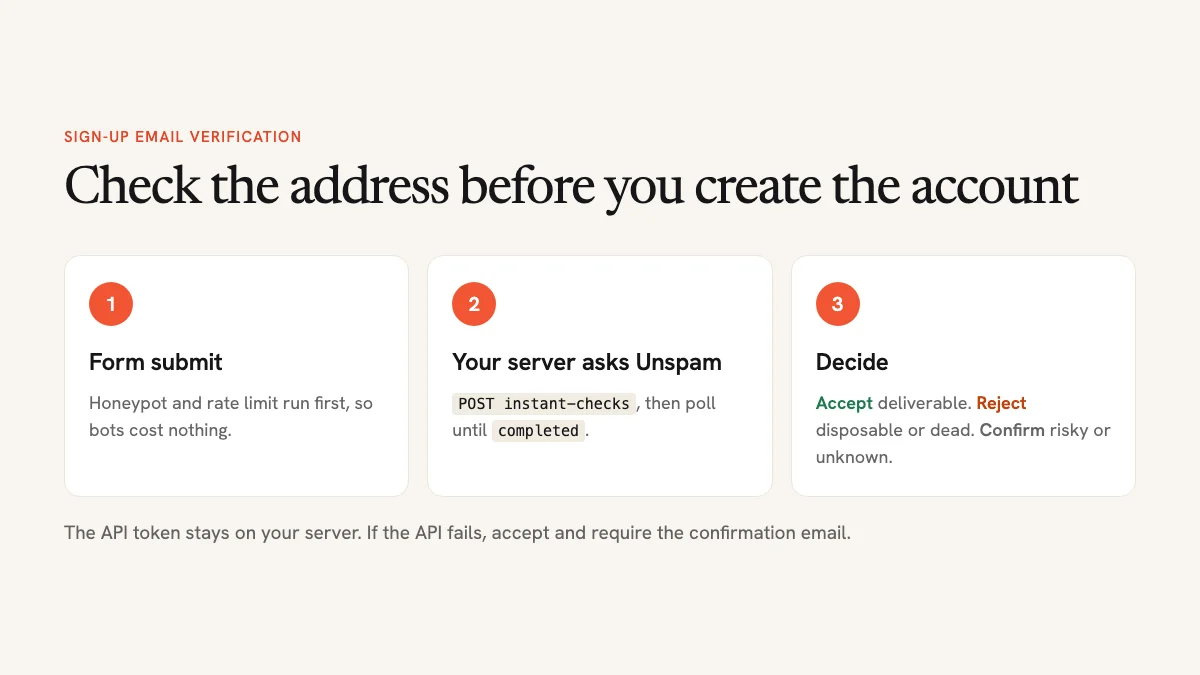
Single-address checks use two calls against the base URL https://api.unspam.email/ext/v2, authenticated with a bearer token:
POST /email-verification/instant-checkswith{"email": "..."}starts a check. It responds with202and an object that has anidand astatusofpending.GET /email-verification/instant-checks/{id}returns the same object. Poll it untilstatusiscompleted. The verdict is then inresult.
A completed check looks like this:
{
  "id": "8d3f1a2b-4c5d-4e6f-8a9b-0c1d2e3f4a5b",
  "email": "jane@gmial.com",
  "status": "completed",
  "result": {
    "status": "undeliverable",
    "reason": "invalid_domain",
    "action": "remove",
    "flags": ["free_provider"],
    "did_you_mean": "jane@gmail.com"
  },
  "charged": true
}
The four fields under result are all you need for a sign-up form:
| Field | Values | What it tells you |
|---|---|---|
status | deliverable, risky, undeliverable, unknown | The overall verdict |
reason | accepted, catch_all, full_inbox, disposable, invalid_syntax, invalid_domain, rejected, disabled, timeout, smtp_unavailable, provider_unverifiable, unknown | Why it got that verdict |
flags | role, free_provider, disposable, throwaway, no_reply | Extra traits, independent of the verdict |
did_you_mean | An address or null | A suggested correction for a likely typo |
The full reference is in Unspam’s OpenAPI document.
Decide What Each Result Means for Your Form
The API gives you facts, and you set the policy. Blocking too much costs you real users, so reject only what is clearly bad and send everything uncertain through a confirmation email. A sensible default:
| Result | Action at sign-up |
|---|---|
deliverable | Accept |
Disposable or throwaway (reason or flags) | Reject and ask for a permanent address |
undeliverable with did_you_mean | Reject and offer the suggestion: “Did you mean jane@gmail.com?” |
undeliverable | Reject and ask the user to check the address |
risky (catch-all, full inbox) | Accept, but require the confirmation link before full access |
unknown, timeout or API error | Accept, but require the confirmation link (fail open) |
“Fail open” matters. If the API is slow or your credits run out, your registration form should keep working. Unknown results include Yahoo and AOL addresses (provider_unverifiable), because those providers don’t confirm mailboxes, and plenty of real people use them.
Role addresses (info@, admin@) are a judgment call. For a B2B product they’re normal. For a consumer app with a free tier, you might mark them for review.
Step 1: Get an API Token
API access comes with Unspam’s Custom plan, which is pay-as-you-go above a $5 monthly minimum. Each unique address with a definitive verdict (deliverable, risky or undeliverable) uses one credit. Duplicates, malformed addresses and unknown results are free. Verifications start at $6.40 per 1,000 addresses, so checking every sign-up costs well under a cent each. Prices were checked in November 2026, and the current ones are on the pricing page.
Create a token in your Unspam account and give each site its own, so you can revoke one without breaking the others. Store it as an environment variable, UNSPAM_TOKEN, on your server. Never put the token in front-end JavaScript. Anyone could read it and spend your credits.
Want to see what the results look like first? The free email verifier checks up to 10 addresses a day without an account.
Step 2: Write the Verification Function
This function starts a check, polls until it finishes, and returns the result object, or null if anything goes wrong. That null is how the form fails open. It uses the built-in fetch, so it needs Node.js 18 or newer.
// verify-email.js
const API = 'https://api.unspam.email/ext/v2/email-verification/instant-checks';
const headers = {
  Authorization: `Bearer ${process.env.UNSPAM_TOKEN}`,
  'Content-Type': 'application/json',
};
const sleep = (ms) => new Promise((resolve) => setTimeout(resolve, ms));

async function verifyEmail(email, timeoutMs = 8000) {
  const deadline = Date.now() + timeoutMs;
  try {
    let res = await fetch(API, {
      method: 'POST',
      headers,
      body: JSON.stringify({ email }),
      signal: AbortSignal.timeout(timeoutMs),
    });
    if (!res.ok) return null; // 401, 403 (no credits), 422, 429: fail open
    let check = await res.json();

    while (check.status === 'pending' && Date.now() < deadline) {
      await sleep(700);
      res = await fetch(`${API}/${check.id}`, { headers, signal: AbortSignal.timeout(timeoutMs) });
      if (!res.ok) return null;
      check = await res.json();
    }
    return check.status === 'completed' ? check.result : null;
  } catch {
    return null; // network error or timeout
  }
}

module.exports = { verifyEmail };
A check has to wait for the recipient’s mail server to answer, and some servers are slow. The 8-second deadline keeps one of them from hanging your form: when time runs out, the function returns null and the user gets in with a required confirmation email.
Step 3: Turn the Result into a Decision
Keep the policy from the table above in one small function, so you can tune it without touching the API code:
function signupDecision(result) {
  // API unavailable or no verdict: let them in, but require confirmation
  if (!result || result.status === 'unknown') return { allow: true, confirm: true };

  const flags = result.flags || [];
  if (result.reason === 'disposable' || flags.includes('disposable') || flags.includes('throwaway')) {
    return { allow: false, message: 'Please use a permanent email address, not a temporary one.' };
  }
  if (result.status === 'undeliverable') {
    return {
      allow: false,
      message: result.did_you_mean
        ? `That address can’t receive email. Did you mean ${result.did_you_mean}?`
        : 'That address can’t receive email. Please check it for typos.',
      suggestion: result.did_you_mean,
    };
  }
  if (result.status === 'risky') return { allow: true, confirm: true };
  return { allow: true, confirm: false }; // deliverable
}
Then call both from your registration route. Here it is in Express (with app.use(express.json()) enabled), with a hidden honeypot field checked first, so obvious bots never cost you a credit:
app.post('/register', async (req, res) => {
  if (req.body.website) return res.status(400).end(); // honeypot field, hidden from humans

  const email = String(req.body.email || '').trim().toLowerCase();
  const decision = signupDecision(await verifyEmail(email));

  if (!decision.allow) {
    return res.status(422).json({ error: decision.message, suggestion: decision.suggestion || null });
  }
  const user = await createUser({ email, password: req.body.password, emailConfirmed: false });
  await sendConfirmationEmail(user, { required: decision.confirm });
  res.status(201).json({ ok: true });
});
createUser and sendConfirmationEmail stand in for your own code. The idea is that decision.confirm controls whether a user can do anything meaningful before clicking the link in their inbox.
The Same Thing in PHP
For a PHP backend, including a custom WordPress registration handler, the function looks like this with cURL:
<?php
function unspam_verify(string $email, int $timeout = 8): ?array
{
    $url = 'https://api.unspam.email/ext/v2/email-verification/instant-checks';
    $call = function (string $endpoint, ?array $body = null) use ($timeout): ?array {
        $ch = curl_init($endpoint);
        curl_setopt_array($ch, [
            CURLOPT_RETURNTRANSFER => true,
            CURLOPT_TIMEOUT => $timeout,
            CURLOPT_HTTPHEADER => [
                'Authorization: Bearer ' . getenv('UNSPAM_TOKEN'),
                'Content-Type: application/json',
            ],
        ]);
        if ($body !== null) {
            curl_setopt($ch, CURLOPT_POST, true);
            curl_setopt($ch, CURLOPT_POSTFIELDS, json_encode($body));
        }
        $raw = curl_exec($ch);
        $code = curl_getinfo($ch, CURLINFO_HTTP_CODE);
        return ($raw !== false && $code >= 200 && $code < 300) ? json_decode($raw, true) : null;
    };

    $deadline = microtime(true) + $timeout;
    $check = $call($url, ['email' => $email]);
    while ($check && $check['status'] === 'pending' && microtime(true) < $deadline) {
        usleep(700000);
        $check = $call($url . '/' . rawurlencode($check['id']));
    }
    return ($check && $check['status'] === 'completed') ? $check['result'] : null;
}
It returns the same result array, or null to fail open, so you can port signupDecision line for line.
Step 4: Show Helpful Errors on the Form
A rejected address should never feel like a dead end. Show the message next to the email field, and turn a did_you_mean suggestion into a one-click fix:
const res = await fetch('/register', {
  method: 'POST',
  headers: { 'Content-Type': 'application/json' },
  body: JSON.stringify(Object.fromEntries(new FormData(form))),
});
if (res.status === 422) {
  const { error, suggestion } = await res.json();
  errorEl.textContent = error;
  if (suggestion) {
    fixButton.textContent = `Use ${suggestion}`;
    fixButton.hidden = false;
    fixButton.onclick = () => { form.email.value = suggestion; fixButton.hidden = true; };
  }
}
The form data is sent as JSON, which the Express route reads with app.use(express.json()). The browser only ever talks to your endpoint, never to Unspam directly. If you’re building the form itself, our tutorial on a login form with flat design is a good starting point for the layout.
It’s tempting to check the address live as soon as the user leaves the field. If you do, put the check behind your own endpoint with rate limiting and a debounce. An open “check this email” endpoint lets anyone burn through your credits with a script.
Keep Costs and Limits Under Control
- Verify once, on submit. Checking on every keystroke multiplies your bill for no benefit.
- Run cheap checks first. Honeypot, rate limit and a basic syntax check should all run before the API call, so bots and obvious garbage cost nothing.
- Cache verdicts. Store the result with the address for a few days. A user who fixes their password and resubmits doesn’t need a second check.
- Respect the rate limit. The API allows 100 requests per minute per account and returns
429above that. The function above treats a 429 like any other failure and fails open. - Watch your balance.
GET /statusreturns your remaining monthly limits. When credits run out, checks return403withinsufficient_credits, and your form keeps working without verification until you top up.
Clean Up the Accounts You Already Have
New sign-ups are covered, but your user table may already hold thousands of junk addresses. The list endpoint verifies up to 100,000 at once:
curl -X POST https://api.unspam.email/ext/v2/email-verification/list-checks \
  -H "Authorization: Bearer $UNSPAM_TOKEN" \
  -H "Content-Type: application/json" \
  -d '{ "name": "Existing users", "emails": ["ann@acme.com", "bob@acme.com"] }'
You can also upload a CSV or TXT file instead. Poll GET /email-verification/list-checks/{id} until its status is completed, then page through /results. Each row has the same status, reason and action fields. Rows marked remove are safe to suppress from your mailings. Deactivate those accounts or ask the user for a new address the next time they log in. Results expire after a while (see expires_at), so save what you need.
A clean list pays off in your campaigns too. See our guide to optimizing email templates for higher engagement for the next step.
Layer It with Your Other Defenses
Verification works best as one layer of several:
- Honeypot field: a hidden input that humans never fill in. It costs nothing and stops many basic bots.
- Rate limiting: cap registrations per IP address, for example five per hour.
- Email verification: rejects disposable, non-existent and mistyped addresses.
- Confirmation email (double opt-in): proves the person controls the inbox. Keep it for every risky and unknown result.
- CAPTCHA: add it only if targeted bots get past the layers above, since it adds friction for everyone.
Common Questions
No. The mailbox check asks the recipient’s mail server whether the address exists, and stops before any message is sent. The user never sees it.
Usually because the domain is catch-all: it accepts mail for any address, so the server can’t confirm that this particular mailbox exists. Many company domains work this way. Let these users in and rely on the confirmation email.
You are sharing personal data with a processor, so mention email verification in your privacy policy and check that the provider’s terms fit your data processing agreements. Send only the email address, nothing else about the user.
The functions above give up after 8 seconds and return null, and the form then accepts the user with a required confirmation email. Lower the timeout if your form needs to feel instant, at the cost of more unverified sign-ups.
Fewer Fake Accounts, Better Email
One server-side call at sign-up keeps disposable inboxes, dead domains and typos out of your database. That protects your sender reputation and gives real users a quick way to fix a mistake. Start with the conservative policy above, watch which results you see most, and tighten it once you trust the data.