Penpot and Figma both design interfaces in the browser, with components, prototypes and real-time collaboration. The difference is in everything around the canvas. Penpot is open source, free for teams of up to 8, can run on your own server, and builds its layouts on real CSS Flexbox and Grid. Figma charges per seat, has the bigger ecosystem, and bundles many more products, from FigJam to Figma Sites. This comparison is for web designers and front-end developers deciding between the two. Prices and features come from each vendor's own pages, checked on November 25, 2026.
The Short Answer
- Choose Penpot if cost per seat matters, if you need to self-host for privacy or compliance, or if you hand designs to developers who write CSS. A team of up to 8 pays nothing.
- Choose Figma if you work with clients or companies that already use it, rely on community plugins and UI kits, or want whiteboarding, slides and site publishing in the same subscription.
- Developer handoff is closer than either side's marketing suggests. Penpot's Inspect tab is free for everyone. Figma's free viewers can also see measurements and copy CSS, but its full Dev Mode needs a paid seat.
Penpot vs Figma at a Glance
| Penpot | Figma | |
|---|---|---|
| Licence | Open source (MPL-2.0) | Proprietary |
| Free plan | Professional: full features, up to 8 team members, unlimited viewers, 10 GB | Starter: unlimited drafts, limited access to Figma products |
| Paid plans | $7 per editor a month (capped at $175), Enterprise $25 per member | Professional: $16 Full seat, $12 Dev seat a month (yearly) |
| Hosting | Penpot's cloud or your own server (Docker, Kubernetes) | Figma's cloud only |
| Layout | Flex layout and Grid layout, based on CSS | Auto layout and grids |
| Design tokens | Native tokens in the W3C DTCG format | Variables, with modes |
| Developer handoff | Inspect tab (CSS, SVG, HTML) for every role | Basic inspection free for viewers, full Dev Mode on paid seats |
| AI | Free, open MCP server, bring your own AI agent | AI credits per seat, Figma Make, MCP server on paid plans |
| File format | .penpot: a ZIP of JSON and assets | Proprietary .fig |
| Other products | Design and prototyping | FigJam, Slides, Sites, Make, Draw, Buzz and more |
Pricing: What a Team Actually Pays
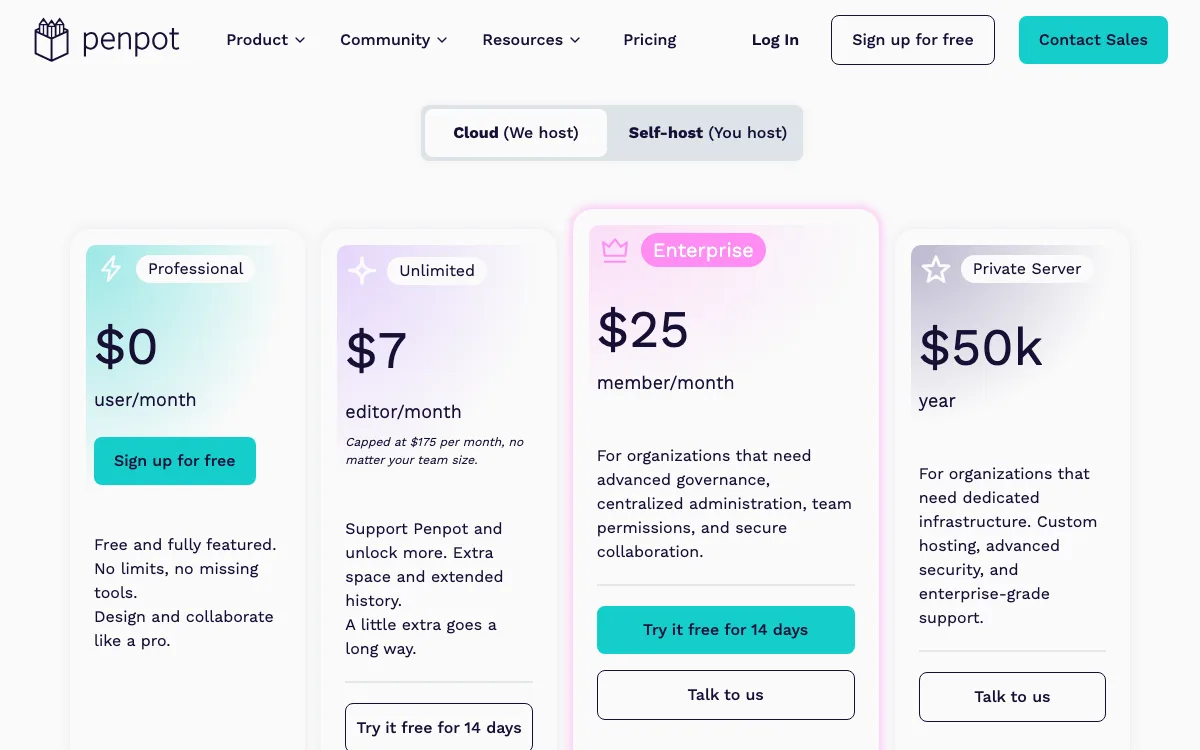
Penpot's cloud plans, from penpot.app/pricing:
- Professional, $0: "free and fully featured", for up to 8 team members with unlimited viewers, 10 GB of storage and 7 days of version history.
- Unlimited, $7 per editor a month: unlimited team size, 25 GB and 30 days of history. The bill is capped at $175 a month however big the team gets. It has a 14-day free trial.
- Enterprise, $25 per member a month: unlimited storage, 90 days of history, and advanced governance with central administration and team permissions.
- Private Server, $50k a year: dedicated infrastructure and enterprise support.
Self-hosting is free. You run the same open-source app on your own machine with Docker or Kubernetes. Penpot says the experience is the same, but self-hosted Docker images are published shortly after each cloud release, so they lag behind slightly.
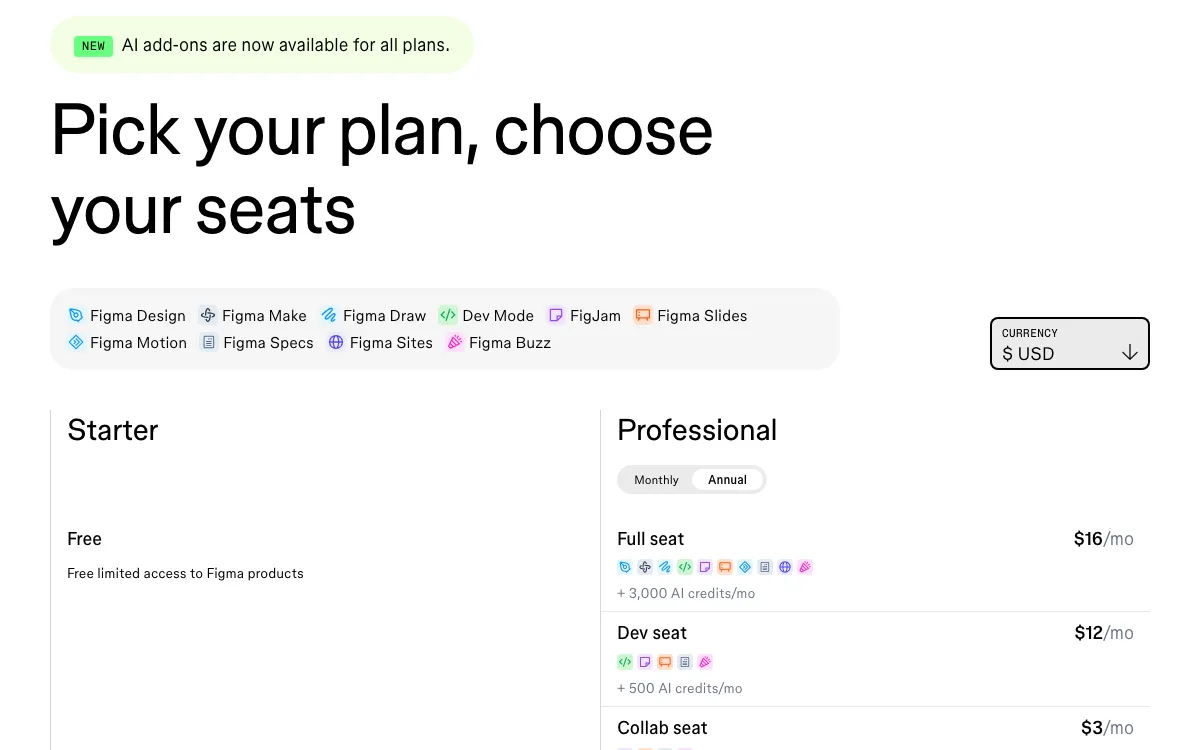
Figma charges for each person by seat type, from figma.com/pricing:
- Starter, free: unlimited drafts and limited access to Figma's products.
- Professional: a Full seat is $16 a month billed yearly or $20 monthly, a Dev seat $12 or $15, and a Collab seat $3 or $5. A Full seat includes every Figma product and 3,000 AI credits a month.
- Organization, billed yearly: $55 Full, $25 Dev, $5 Collab.
- Enterprise, billed yearly: $90 Full, $35 Dev, $5 Collab.
On a paid Figma plan, people who only view and comment don't need a seat. Here is what three team sizes would pay per month on the cheapest paid plan of each, with Figma billed yearly and Penpot developers working as free viewers:
| Team | Figma Professional | Penpot cloud |
|---|---|---|
| 1 designer | $16 (or the free Starter plan) | $0 |
| 3 designers, 2 developers | $72 (3 Full + 2 Dev seats) | $0 (5 members, under the limit of 8) |
| 10 designers, 5 developers | $220 (10 Full + 5 Dev seats) | $70 (10 editors on Unlimited) |
| 40 designers | $640 | $175 (the monthly cap) |
These leave out add-ons such as extra Figma AI credits. A Figma team that big would usually be on Organization, which costs more.
Design Features
For everyday interface work, the two cover the same ground. Both have components with variants, shared libraries, interactive prototypes, vector editing and real-time collaboration, and both run in the browser.
The biggest difference for web designers is layout. Penpot has a Flex layout and a Grid layout that follow the CSS specifications. A board set to Flex uses the same direction, gap, alignment and padding a developer would write, and a Grid layout has real rows, columns and grid units. Figma's auto layout behaves much like Flexbox and it has its own grid, but its terms and options are Figma's own. If you're not sure which CSS layout you need, our Flexbox vs Grid comparison builds the same layouts both ways.
Design tokens are the second difference. Penpot's tokens follow the W3C Design Tokens Community Group format, so they can be exported and used in code or other tools without conversion. They support aliases, maths such as {spacing.base} * 1.5, and themes. Figma uses variables with modes. The Professional plan allows 10 modes, Organization 20 and Enterprise unlimited.
Figma is ahead on breadth. A Full seat includes Figma Make for AI prototypes, Figma Sites for publishing, FigJam for whiteboarding, Slides, Draw, Buzz and Motion. Its pricing page also lists video in prototypes, 3D transforms (beta), and branching and merging on higher plans. Penpot focuses on design and prototyping, and leaves the rest to other tools.
Developer Handoff
This is where the two are closest, and where both vendors' comparison pages oversimplify.
- Penpot gives every role, including viewers, the full Inspect tab, with CSS, SVG and HTML for any selection. Its comparison page counts this against Figma's paid Dev Mode.
- Figma's pricing FAQ says free viewers can view measurements and property values, copy CSS, iOS and Android code, and export assets. What needs a Dev or Full seat is the rest of Dev Mode: Code Connect, which maps design components to your real code components, ready-for-dev statuses, and the Figma MCP server on paid plans.
So a developer can read a design for free in either tool. Penpot's advantage is that the CSS it shows comes from layouts built on CSS, so a Flex board turns into Flexbox code with the same values. Figma's advantage is the paid tooling around handoff, such as Code Connect, for teams with a component library in code. If you're turning a design into a live page, our guide to publishing a Figma design as a website compares the options.
AI and MCP
The two take opposite approaches. Figma builds AI into its products and meters it in credits: 3,000 a month on a Professional Full seat, 500 on other seats and on Starter, with more for sale. Its MCP server gives AI coding agents structured design context, and it's listed with Dev Mode on paid plans.
Penpot doesn't sell AI. Instead it offers a free, open-source MCP server that connects any agent you choose, such as Claude, Cursor, VS Code or OpenAI Codex, to your files through its plugin API. You can use the version Penpot hosts or run it on your own server, and Penpot says there are no credit caps. You still pay for your own AI agent. Whichever tool you use, a DESIGN.md file helps coding agents stick to your design system.
Self-Hosting, Ownership and Lock-In
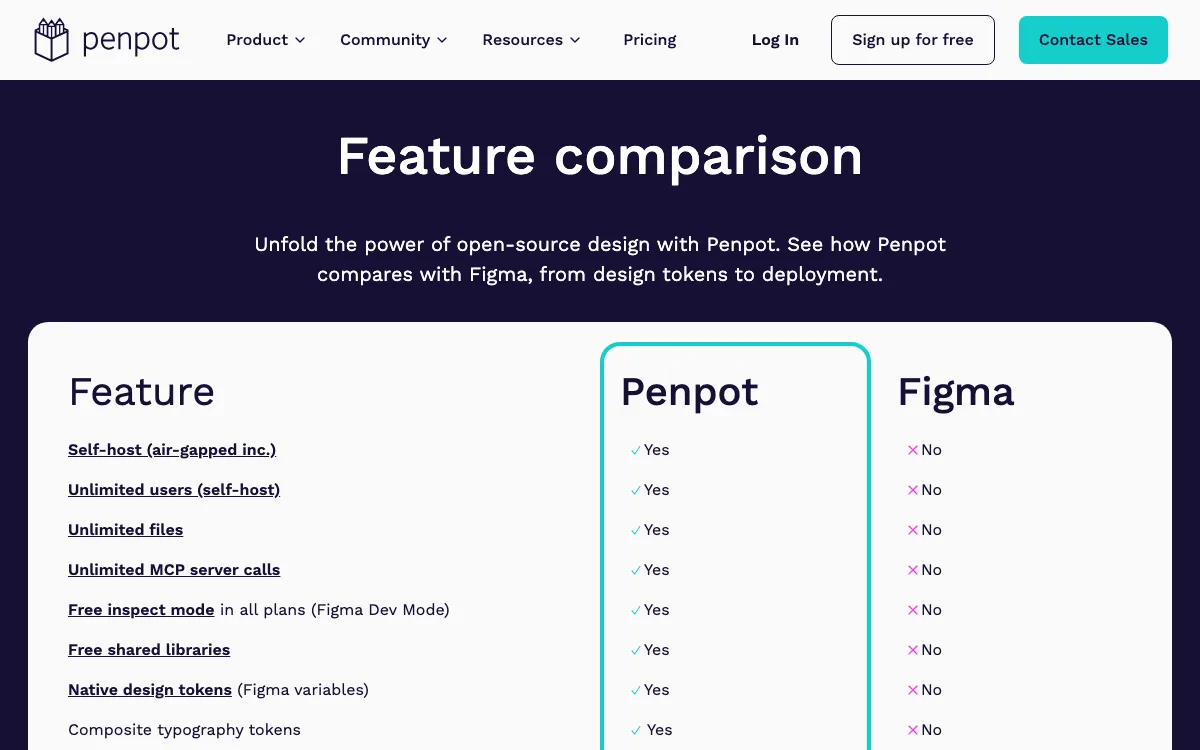
Penpot's licence is MPL-2.0, and its GitHub repository is public. Its latest release was 2.19.5 on November 24, 2026. Self-hosting is documented with Docker Compose, a Helm chart for Kubernetes, OpenShift and Rancher, plus Elestio and TrueNAS. For agencies with strict client contracts, public bodies or anyone who can't put designs in someone else's cloud, this is the deciding feature, and Figma has no equivalent.
Files are open too. A .penpot export is a ZIP with a readable JSON structure and the image assets, so other tools and scripts can read it. Figma's files live in Figma's cloud. You can download a copy, but only Figma can open it.
The flip side is ecosystem. Figma is the tool most design teams, job ads and UI kits assume, and its community has far more plugins and templates. Penpot has its own plugin system and a hub of templates and libraries, but the choice is smaller.
Moving from Figma to Penpot
Penpot's migration page describes three steps: create a free Penpot account, export your Figma files with the Penpot Exporter Figma plugin, then import them into Penpot. Penpot imports files up to 1 GB, and it has a separate migration guide for large teams. Before you move a whole design system, try one complex file and check components, variants and text styles carefully, since no converter between two different file formats is perfect.
Which Should You Choose?
- You're a freelancer or a small studio: Penpot. The free plan covers up to 8 people with every feature.
- You must keep designs on your own servers: Penpot, self-hosted.
- Your developers write CSS by hand: Penpot, for layouts and tokens that map straight to code.
- Your clients or employer already use Figma: Figma. Swapping files back and forth costs more than the seats.
- You want whiteboards, slides and site publishing in one place: Figma.
- You have a coded component library and want design mapped to it: Figma, with Code Connect on a paid Dev Mode seat.
For other options, such as Sketch, Lunacy and Pixso, see our full list of Figma alternatives.
FAQ
Is Penpot as good as Figma?
For interface design, prototyping and developer handoff, Penpot covers the essentials, and its CSS-based layouts and design tokens are a step ahead for web work. Figma is ahead on ecosystem, AI features and the range of products in one subscription.
Is Penpot really free?
Yes. Penpot's free cloud plan includes every feature for teams of up to 8 members with unlimited viewers, and self-hosting the open-source app costs nothing but your server. Paid plans add team size, storage, history and enterprise controls.
Can I import Figma files into Penpot?
Yes. Export them from Figma with the Penpot Exporter plugin, then import them into Penpot. Check complex components and text styles after the import.
Do developers need a paid seat in Figma?
Not to read a design. Free viewers can see measurements, copy CSS and export assets. A Dev seat, $12 a month billed yearly on Professional, adds the full Dev Mode, including Code Connect and the MCP server.
Can I self-host Figma?
No. Figma only runs in Figma's cloud. Penpot can run on your own server with Docker or Kubernetes.
Does Penpot work with AI agents?
Yes, through its free and open MCP server, which connects agents such as Claude, Cursor and VS Code to your Penpot files. Penpot doesn't sell AI credits. You use the agent and model you already pay for.