Web Designer Hut ran on WordPress from 2014 until November 2026. Between November 4 and 9 we turned it into plain HTML files kept in Git. They deploy with a CI job, and the WordPress install stays parked on the server as a rollback. This is the full record of how we did it: the export, the cleanup, every kind of redirect we needed, what we replaced, what we lost, and what we measured. All the numbers come from this site’s own repository and server responses.
If you are still deciding whether static suits your site at all, read static vs dynamic websites first. If you are weighing other platforms, see our WordPress alternatives.
The Short Answer
- Easiest route: the free Simply Static plugin exports your site to a ZIP. Deploying straight to a host, forms and search need Simply Static Pro at $99 a year per site.
- Our route: crawl the live site, save every page as HTML, then clean it up in Git. This takes more work, but you end up owning plain files with no plugin in the loop.
- The part that takes longest isn’t the export. Keeping every old URL working with 301s, and telling search engines about removed pages with 410s, took longer.
- Simplest hosting for the export: Static.app takes the ZIP that Simply Static produces, hosts it with unlimited traffic and handles contact forms on its paid plans. It has a 7-day trial, then costs from $5 a month billed yearly.
- Keep WordPress as a rollback. We switched the domain’s document root to a new folder and left WordPress untouched in the old one.
- What changed: the home page went from a Lighthouse score of 74 to 97 and from 1,849 KB to 293 KB. The site folder shrank from 1.3 GB to under 150 MB, and there are no more core or plugin updates.
Why We Did It, and What We Expected

Three reasons. First, the site is a blog: every page is the same for every visitor, so running PHP and a database on each request did nothing useful. Second, upkeep. WordPress core, the theme and every plugin needed updates, and a missed one is how sites get into trouble.
Third, ours did. In 2026 the WordPress install was compromised and began serving Japanese-language spam pages under paths like /product/ and /new-arrival/, plus spam query strings on the home page. Some real posts went missing or were damaged as well. A static site removes the code an attacker would target: there is no login page, no xmlrpc.php and no plugin code to exploit.
We expected faster pages and less maintenance. We also expected to lose the WordPress editor, comments and scheduled posts, and we accepted that, because one person edits this site and is happy working in HTML.
Your Options for Converting WordPress to Static HTML
There are three common ways to do it. Prices and plugin details were checked on November 12, 2026.
1. A static export plugin
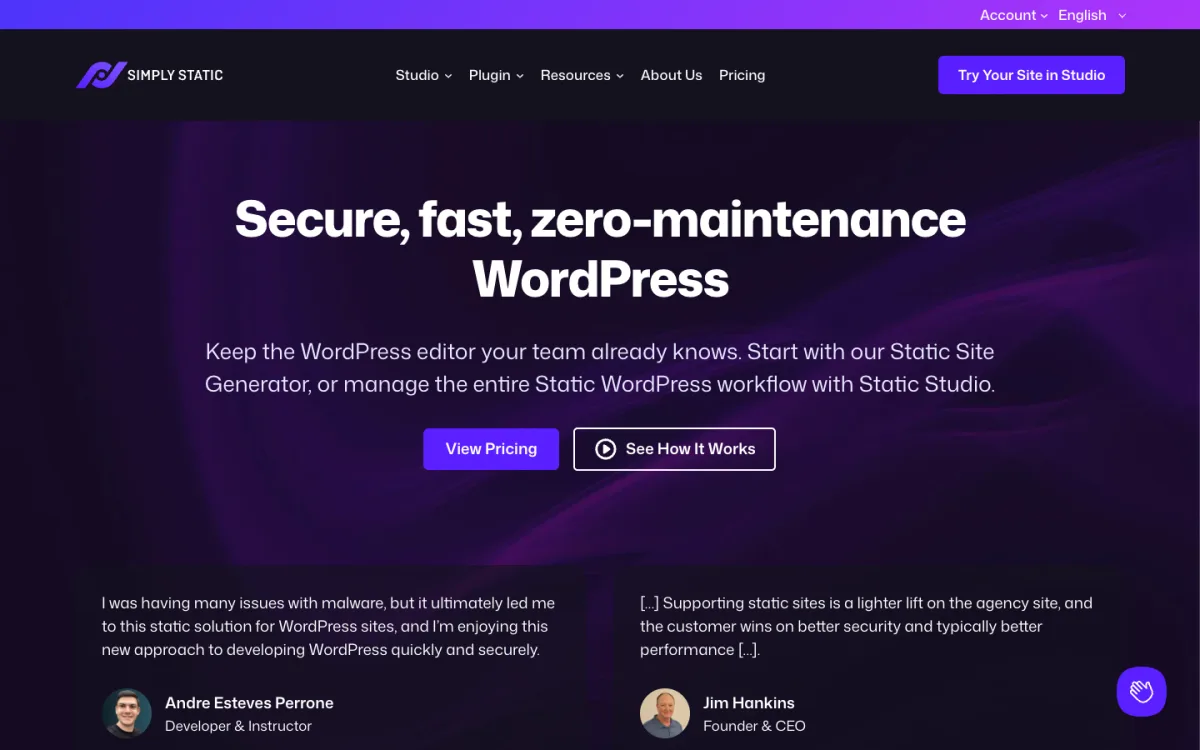
Simply Static has 30,000+ active installs on WordPress.org. The free version generates a static copy of your site and saves it as a ZIP file or to a folder on the server. Pro, at $99 a year for one site, adds deployment to GitHub, Netlify, Cloudflare Pages, S3, BunnyCDN or SFTP, plus incremental exports, working forms, search, comments and redirects. Its maker also sells Simply Static Studio, a hosted service, from $12 a month.
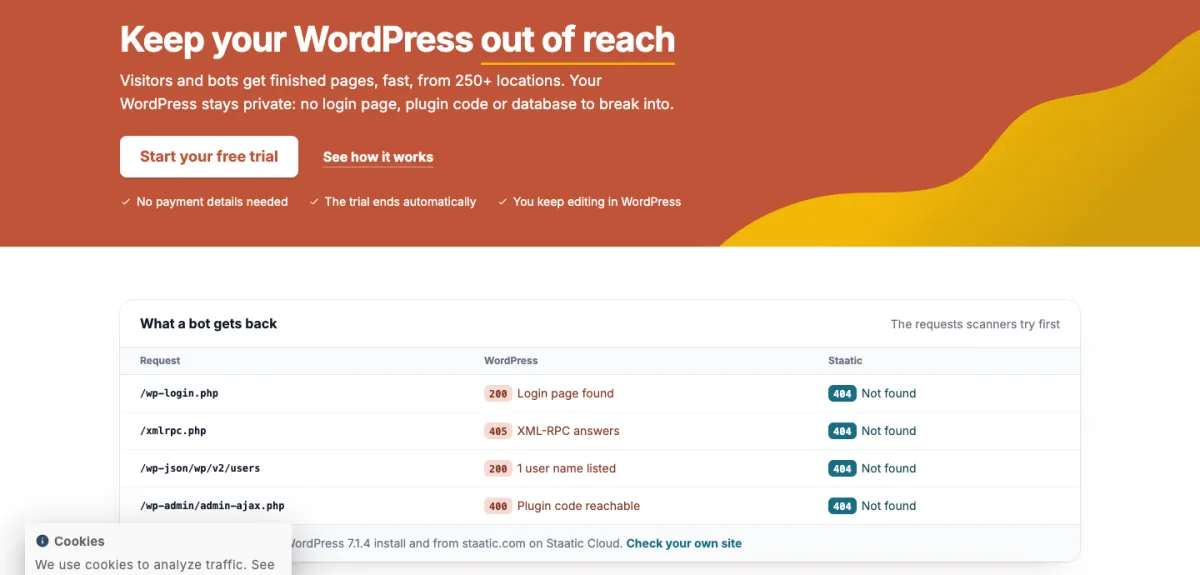
Staatic is smaller, with 3,000+ installs. Its free plugin can deploy to a local folder, a ZIP, Amazon S3, GitHub, Netlify or SFTP, and it handles redirects, a custom 404 page and HTTP headers. Forms and search are premium features.
The big advantage of a plugin is that you keep the WordPress editor. You write in WordPress as before, then export, so WordPress keeps running somewhere, usually on a private address. The drawback is that you still maintain WordPress, just out of public view.
2. Crawl and save (what we did)
A crawler visits every page of the live site and saves the HTML, CSS, JavaScript and images exactly as visitors receive them. Afterwards you edit those files directly and WordPress is gone from the workflow. It works with any theme or plugin, because it only sees the output. The downside is the cleanup, described below.
3. Headless WordPress with a static site generator
WordPress stays as the editing back end, and a static site generator such as Astro, Eleventy or Hugo pulls content through the WordPress REST API or a GraphQL plugin and builds the site. You get the editor plus a modern front end, but you rebuild the theme from scratch and maintain two systems. It suits teams with developers and several non-technical writers.
| Approach | Keeps the WordPress editor | WordPress still runs | Effort | Best for |
|---|---|---|---|---|
| Export plugin | Yes | Yes, privately | Low | Sites with non-technical editors |
| Crawl and save | No | No (kept only as a rollback) | Medium, mostly cleanup | Blogs edited by developers |
| Headless + generator | Yes | Yes, as an API | High | Teams rebuilding the front end anyway |
Our Export and Cleanup
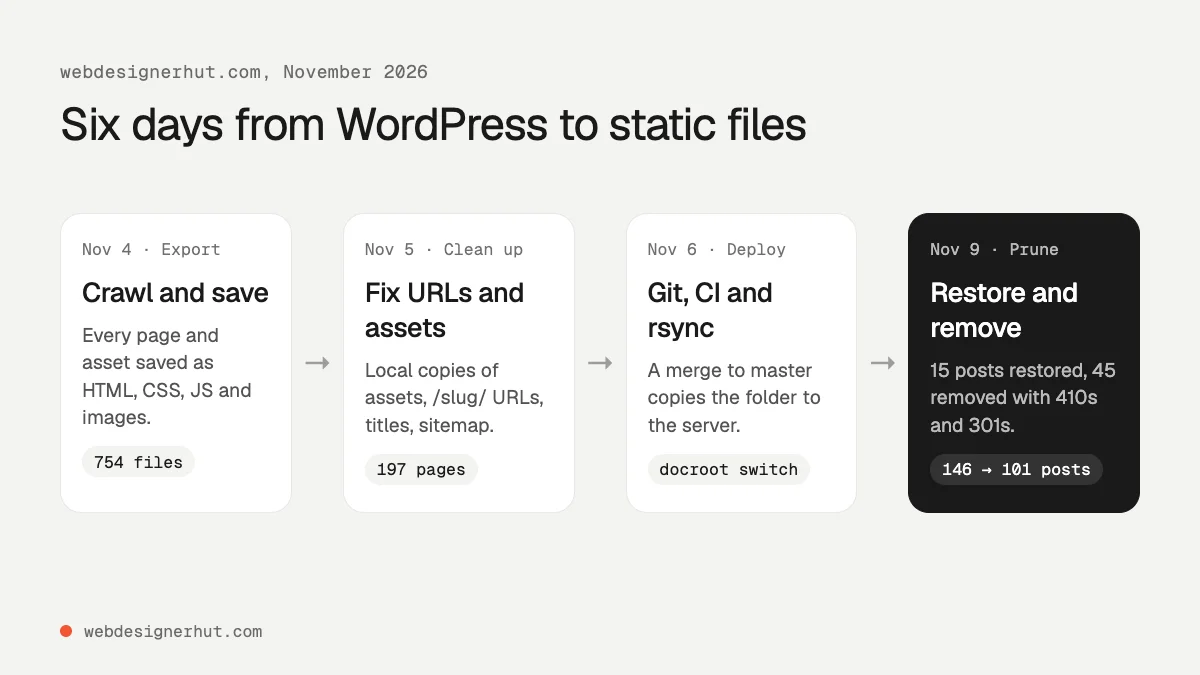
The first commit, on November 4, held 754 files: 137 dated posts, plus category, author and pagination pages, and 553 files under wp-content. The crawler saved files exactly as WordPress linked them, so some names still carried version strings, such as comment-reply.min.js?ver=7.1.4. The cleanup took the next five days:
- Assets pointing at the live site. Many pages still loaded images, CSS and theme scripts from the WordPress domain. We downloaded those files, dropped the
?ver=suffixes and pointed every reference at the local copies. Without this step, the static site would have broken the moment WordPress went offline. - Clean internal links. We removed
index.htmlfrom internal links and made canonical tags absolute, clean URLs. - Dates out of URLs. Posts lived at
/2015/03/06/slug/. We moved them to/slug/and merged nine posts that existed at both a dated and a short address. - WordPress leftovers. We stripped the WordPress generator tag and REST API links from every page head, and fixed shortcodes that had rendered as raw text.
- CSS. The theme loaded large shared stylesheets. A script now works out which rules each page actually uses and inlines only those in the page.
- Images. Everything under
wp-content/uploadsmoved to/images/, with new WebP thumbnails.
The hack added a step most migrations won’t need. Fifteen posts, including our best static hosting roundup, were damaged or missing in the export, so we restored them from Wayback Machine snapshots taken before the compromise. Most of their images could not be recovered and were replaced later.
We also used the move to prune. Of 146 posts, we removed 45 that were paid API reviews, theme promotions or thin, dated lists, and expanded 11 thin ones. That left 101 posts. We have published 23 new ones since, including this one, for 124 today.
Keeping URLs and SEO: 301s, 410s, Sitemap, Canonicals
A static site can’t run PHP, but on Apache it still reads .htaccess, and that is where all our redirect rules live. Every old URL now falls into one of four groups.
301 for anything that moved
# Old dated permalinks to /slug/
RewriteRule ^[0-9]{4}/[0-9]{2}/[0-9]{2}/([^/]+)/?$ /$1/ [R=301,L]

# Images and theme files moved out of the WordPress folders
RewriteRule ^wp-content/uploads/(.*)$ /images/$1 [R=301,L]
RewriteRule ^wp-content/themes/(.*)$ /assets/themes/$1 [R=301,L]

# A removed post with a close replacement
RewriteRule ^free-login-form-psd/?$ /login-form-with-flat-design/ [R=301,L]
The image rule keeps old backlinks and Google Images results working. Three of the 45 removed posts had a close replacement, so they redirect instead of disappearing. Listing pages that no longer exist, such as the last pages of the old pagination and a renamed category, redirect to their nearest equivalent.
410 for anything removed on purpose
# Posts removed in November 2026 (42 slugs in four rules)
RewriteRule ^(zerossl|weatherstack-api|ipstack|...)/?$ - [G,L]

# Spam URLs from the compromise
RewriteRule ^product(/|$) - [G,L]
RewriteRule ^new-arrival(/|$) - [G,L]

# Spam query strings like /?i=77282594333
RewriteCond %{QUERY_STRING} ^[a-z]=[0-9]{8,}/?$ [NC]
RewriteRule ^(page/[0-9]+/?)?$ - [G,L]
The [G] flag returns 410 Gone. A 404 says “not found, maybe later”; a 410 says the page was removed deliberately, which tells search engines to drop it. Don’t also block these paths in robots.txt: a crawler that can’t fetch a URL never sees the 410. We point both 404 and 410 at the same themed error page with ErrorDocument.
Keep the query-string rule narrow. Ours only matches a single letter followed by eight or more digits, so ?utm_source= links and the site’s own search, ?s=css, still return 200.
Test every rule against the live server
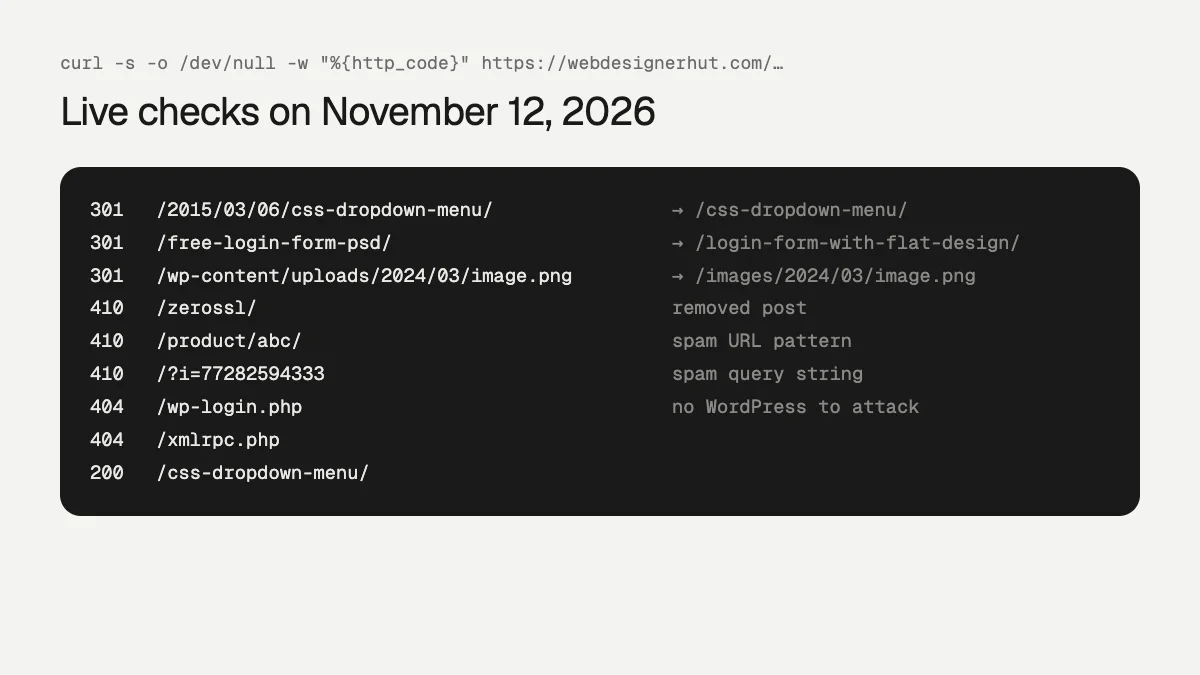
After each change we request a sample of old URLs and compare the status codes with what we expect:
for u in /2015/03/06/css-dropdown-menu/ /zerossl/ /product/abc/ /wp-login.php; do
  curl -s -o /dev/null -w "%{http_code} %{redirect_url} $u\n" "https://webdesignerhut.com$u"
done
The WordPress endpoints that bots probe all day, /wp-login.php, /wp-admin/ and /xmlrpc.php, now return a plain 404.
Sitemap, canonicals and metadata
WordPress and its SEO plugin generated the sitemap, canonical tags and social tags. On a static site, that becomes your job. We wrote a new sitemap.xml and robots.txt, gave every page a self-referencing canonical, a meta description, Open Graph tags and JSON-LD, and made sure each page has exactly one H1. Our publishing script adds new posts to the sitemap automatically, so it can’t fall out of date.
Replacing the Dynamic Features
- Search: WordPress searched the database. Now a script builds a JSON index of every post’s title, description and category, about 120 KB for the 124 posts here, and a small script searches it in the browser. For larger sites, Pagefind does the same job and loads only the parts of the index it needs.
- Related posts and listings: once done by the theme, now generated by scripts that rewrite the category pages, pagination and a related-posts block whenever we publish.
- Comments: dropped. The old posts had few, and we didn’t want a third-party script on every page. If you need them, Giscus stores comments in GitHub Discussions.
- Forms: this site never had a contact form, so nothing to replace. On yours, point the form at a form backend, or use the built-in forms of a host such as Static.app; our HTML contact form guide shows how.
- RSS: we lost it. WordPress generated
/feed/, which now returns 404. It’s on our list to rebuild as a static XML file. Check your feed before you switch, because readers and aggregators depend on it. - Scheduled posts: gone. A post goes live when its merge lands.
Deploying: Git, CI and rsync, with WordPress as a Rollback
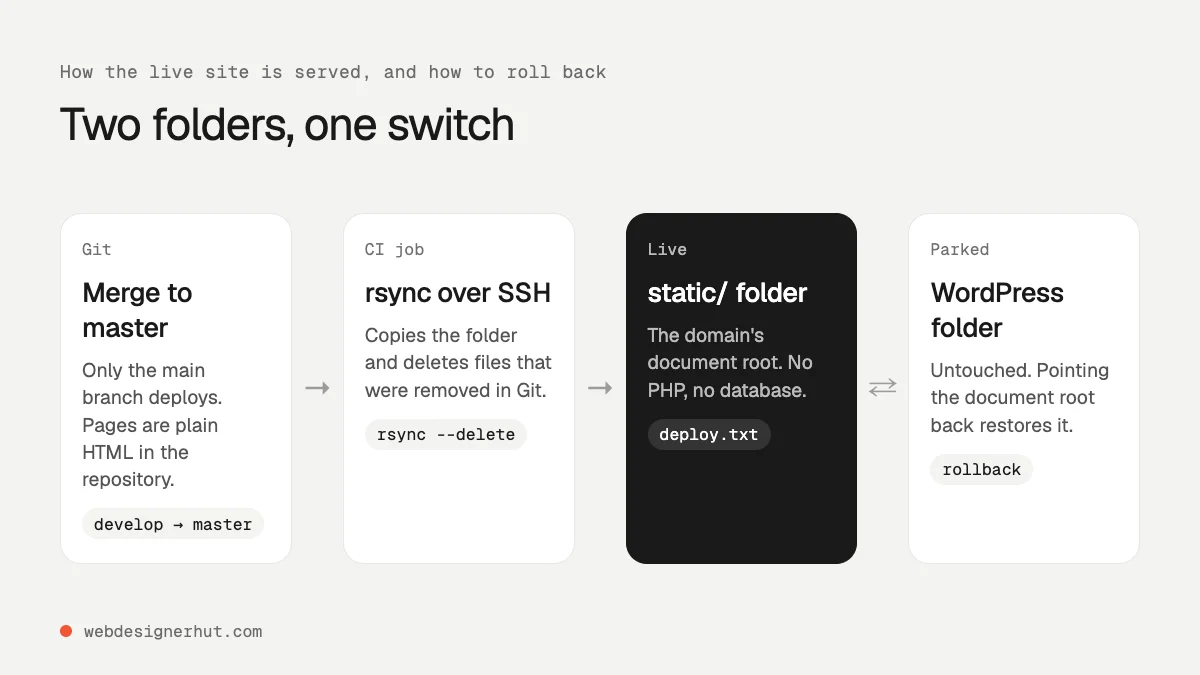
We didn’t move hosts. The site stays on the same server, managed with Plesk. We changed three things:
- A new folder. We created an empty
staticfolder next to WordPress’s and backed up the WordPress files first (1.3 GB). - A CI job. On every merge to the main branch, a GitLab CI job in a small Alpine container copies the repository’s
src/folder to the server withrsync --delete, so files removed in Git disappear from the server too. The SSH key and known-hosts entry live in protected CI variables. The job also writes adeploy.txtfile with the commit hash and time, so a single request shows which version is live. - The switch. We pointed the domain’s document root from the WordPress folder to
static. That one setting is the whole cut-over, and the whole rollback: point it back and WordPress serves again, exactly as we left it.
Two details are easy to miss. The rsync --delete must exclude .well-known/, or the next deploy wipes your HTTPS certificate challenges. And back up the database too if you might ever delete the WordPress folder; a file backup alone can’t restore WordPress.
If you’d rather not run a server, the same static folder can go to Cloudflare Pages, Netlify or any host in our static hosting roundup.
A good fit for the plugin route: Static.app

If you export with a plugin, Static.app is the shortest path from WordPress to a live static site. Export a ZIP with the free Simply Static plugin, drag it into Static.app, and connect your domain. There is no Git, CI or server to set up, which makes it a good match for designers and small businesses rather than developers.
It also covers two of the gaps a static WordPress export leaves. Forms work by adding a static-form attribute to the form, with submissions collected in the dashboard, so you can drop the contact-form plugin. And you can set 301, 302, 307 or 308 redirects for moved pages. Redirects are set page by page, so a site with pattern rules like our dated-permalink redirect is better served by a host that reads a rules file. Traffic is unlimited on every paid plan.
Static.app has a 7-day trial, not a free plan. Starter costs $5 a month billed yearly, or $6 monthly, for 2 sites; Medium is $10 or $12 for 7 sites. Forms, custom domains and redirects need a paid plan. Prices checked on November 12, 2026.
Results After One Week
The site has been static since November 6. That is too early for search traffic to tell us anything, and we won’t pretend otherwise. This is what we can measure today.
| Measure | WordPress | Static |
|---|---|---|
| Home page Lighthouse score (mobile) | 74 | 97 |
| Home page Largest Contentful Paint | 6.3 s | 2.4 s |
| Home page weight | 1,849 KB | 293 KB |
| Site folder on the server | 1.3 GB | 147 MB |
| Posts | 146 | 124 (101 kept, 23 new) |
| Broken internal links (crawl of the live site) | not measured | 0 across 170 pages |
| Core and plugin updates to apply | Ongoing | None |
| Deploys since the switch | n/a | 41 merge requests in 7 days |
The Lighthouse figures are medians of three mobile runs with Lighthouse 10.4, from our static vs dynamic comparison. Two caveats apply. The “before” pages were a static copy of WordPress’s output, so they leave out the time WordPress spent running PHP and queries; the real site was slower. And the site was redesigned at the same time, so not every gain comes from going static.
On search, Ahrefs still showed 3 ranking keywords and no estimated organic traffic on November 12. That is unchanged from November 10, when we last checked before this article. We will update this section with Search Console data once there are a few weeks of it.
What We Would Do Differently
- Back up the database on day one. We backed up the files but not the database, so the rollback depends on the old install staying intact.
- List every URL before you start. Pull the old sitemap, your top pages from Search Console and your top backlinked pages. Then test each one after the switch. We found the merged duplicates and missing posts only by comparing lists.
- Rebuild the RSS feed before the switch. Not after.
- Script everything you repeat. Publishing a post here now means running one script that writes the page, updates listings, the sitemap and search index, and renders the thumbnail. Doing that by hand on a static site is how pages drift out of sync.
FAQ
Can I convert WordPress to static HTML for free?
Yes. The free Simply Static plugin exports your site to a ZIP file, and Staatic’s free plugin can also deploy to S3, GitHub, Netlify or SFTP. You can also crawl your site and save the output. Free static hosts such as Cloudflare Pages and GitHub Pages can serve the result.
Will converting WordPress to static hurt my SEO?
Not if every old URL either still works or redirects with a 301, and removed pages return 410. Keep your titles, descriptions, canonicals and sitemap. Faster pages can help a little, but content and links matter far more.
Can I keep using the WordPress editor?
Yes, with an export plugin or a headless setup. WordPress keeps running privately and you publish by exporting. With crawl-and-save, as here, you edit the HTML instead.
What happens to comments and forms?
They stop working, because they need a server. Use a form backend for forms and a hosted service such as Giscus for comments, or drop them. Simply Static Pro and Staatic’s premium plan include form handling.
How do I roll back if something goes wrong?
Keep WordPress where it is, serve the static files from a different folder, and switch the document root. Switching it back restores WordPress. Back up both the files and the database before you start.
Is a static site more secure than WordPress?
It has far less to attack: no login page, no database and no plugin code running on requests. Your server, hosting account and Git repository still need strong passwords and updates.